
A Private Secure Communication Platform for Your Business
Enjoy encrypted texting, secure audio,
and video calling all on a private,
enclosed platform designed
for your team.
Simple to set up, effortless to use, and fully tailored to you.

Introducing
xPal Spheres Secure
Messenger
xPal Spheres takes secure communication to the next level by providing customisable "spheres" for your team, business, or personal network.
Built on the foundation of xPal's signature security features, xPal Spheres ensures every message is encrypted, private, and limited to the people you trust.

Custom Spheres:
Create exclusive groups with specific access and permissions.
Your Conversations Stay Private, Always
Your conversations remain confidential, no matter what.
Absolute Privacy:
No personal information required—communicate with xIDs only
Control Like Never Before:
Use features like 'Terminate' to erase conversations completely.
Seamless Connectivity:
All you need is Wi-Fi, no service provider required.
Whether it's for your business, family, or inner circle, xPal Spheres empowers you to communicate securely and privately.
Your World, Your Rule
Welcome to xPal Spheres
Effortless Team Setup

Set up and manage your team members to different teams.

You maintain full control over each member's communication permissions, ensuring that your business communications remain private and secure.

Enable secure texting, audio, and video calls for all your team members, all protected by military-grade 256 AES encryption.
xPal Spheres Features

Secure Communication
All texts, audio, and video calls are end-to-end encrypted with cutting-edge 256-AES Military Grade Encryption, safeguarding your business secrets.
Privacy and Anonymity
No phone numbers, email addresses, or personal information needed. Assign each team member a 9-digit xID, allowing secure communication without sharing personal data.

Total Control

Terminate a team member's xID and clear all chat history, including conversations with others, directly from their device.

Assign or reassign XIDs to new or existing team members with ease.

Block members at any time, giving you full control over your team's communications.
Privacy & Security First
With xPal Teams, you get complete privacy and security through the use of secure 9-digit xIDs rather than phone numbers.
Each team member communicates using their unique xID on the xPal platform, eliminating the need for personal phone numbers, and maintaining privacy.

No Data Stored On Servers:
Once delivered, no information is stored on any server. All messages and documents are encrypted and remain only on the sender's and recipient's devices until erased or the xID is terminated.
Encrypted Storage:
All data is encrypted when not in use, ensuring your information remains protected.
Getting Started
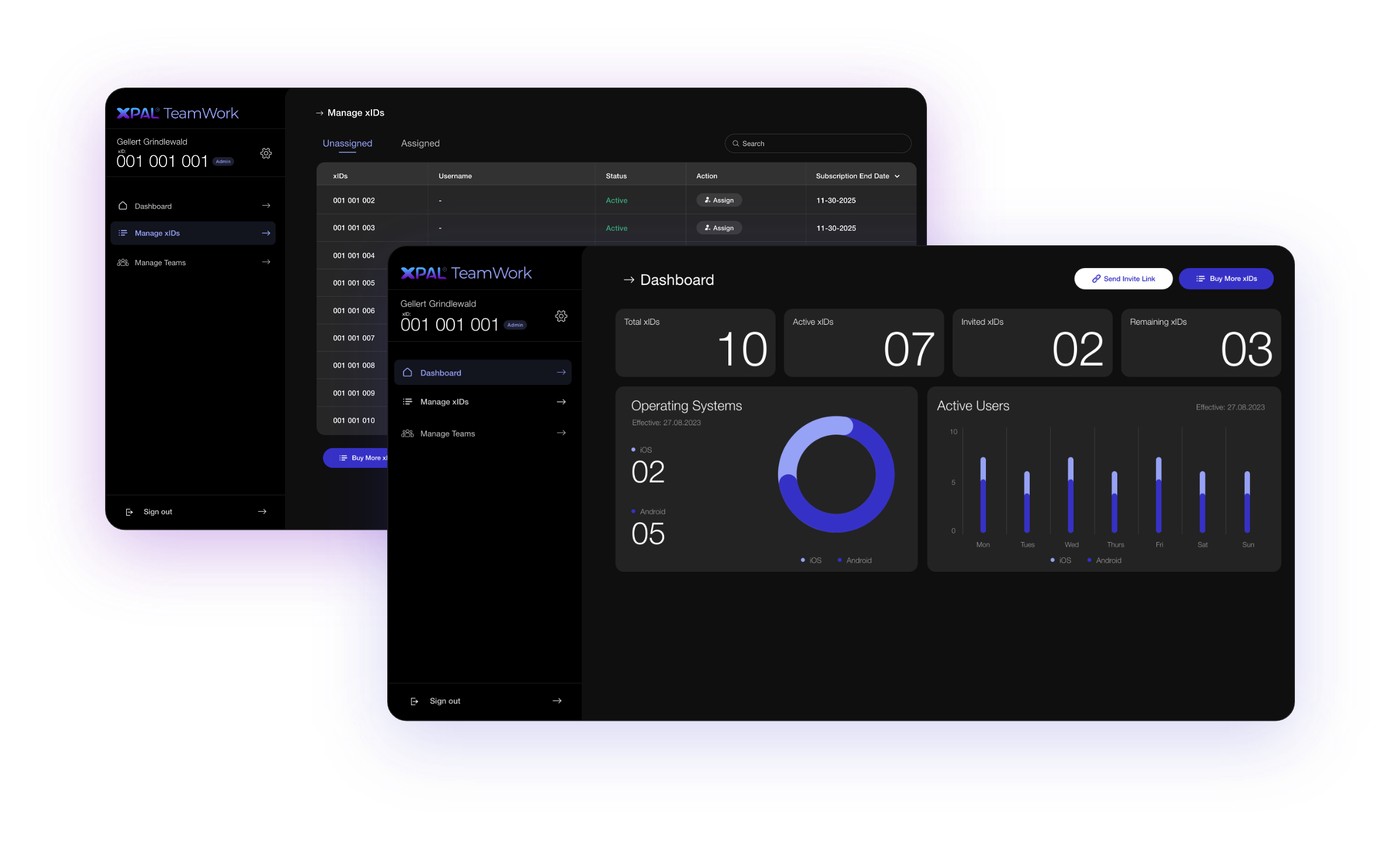
Simply purchase the number of unique xIDs you need for your team at a discounted rate. You can always add more as your team grows. Once purchased, you will have access to the Spheres Control Panel.
With the Spheres Control Panel you can:
Create and manage teams.
Assign xIDs to each team member.
Manage communication permissions of each member.
Quickly add, delete, block, or reassign xIDs
Protect your communications with the ability to Terminate any team member's xID and
erase all communication history – both on your device and theirs.

4 Easy Steps to Get Your Team Texting and Calling Securely:
STEP1

Purchase a Group
of xIDs:
Acquire xIDs, at a discounted price, for your team to enable secure communication
STEP2

Assign xIDs Through
the Control Panel:
Access the Control Panel to assign each xID to a team member. They'll be notified and can set up their account easily.
STEP3

Organize
Your Teams:
Create teams (e.g., All Employees, Sales Crew) and assign members to their respective groups.
STEP4

Set Communication
Privileges:
Create and adjust privileges for each team member to customize their access.
4 Easy Steps to Get Your Team Texting and Calling Securely:
STEP1
Purchase a Group
of xIDs:
Acquire xIDs, at a discounted price, for your team to enable secure communication
STEP2
Assign xIDs Through
the Control Panel:
Access the Control Panel to assign each xID to a team member. They'll be notified and can set up their account easily.
STEP3
Organize
Your Teams:
Create teams (e.g., All Employees, Sales Crew) and assign members to their respective groups.
STEP4
Set Communication
Privileges:
Create and adjust privileges for each team member to customize their access.